Tech Tuesday – September 5: Lecture Schedules, Exam Tagging, and Google Tasks in Meeting Notes
TechTuesday
A weekly tip email from your neighborhood Instructional Technology and eHR team.
Tip #1 – It’s already SEPTEMBER!!!!
Ok, that was an easy tip. Here are two more.
Tip #2 – Course directors, we need your help, so we can help you!
- Lecture schedules – We require that you record your lectures for multiple reasons including when students must quarantine or if a lecture is missed next year and we need to push a recording out. To record lectures, we must have your lecture schedule. If you have not sent lecture schedules to either Bryan or Stephanie so they can schedule recordings, this must be done ASAP. If anything changes for a lecture, like date, room, time, or title, please notify us immediately.
- Exam tagging – Do you want to see which of your course objectives your students struggle with every year? How many questions pertaining to each objective are you actually asking? Answers like these can only be found if you tag your exam questions, which means you assign course objectives and school-wide objectives to each exam question. During the exam process, Stephanie and Bryan will ask you to tag your exam questions. Please do so, partially because it’s required, and partially, because it will provide rich longitudinal data that will improve your teaching.
Tip #3 – Last week we showed how Google Calendar Events and Google Docs have united to make note taking in meetings really seamless, efficient, and really fun!
Let’s revisit and show how you can start sending action items directly to someone’s Google Task list.
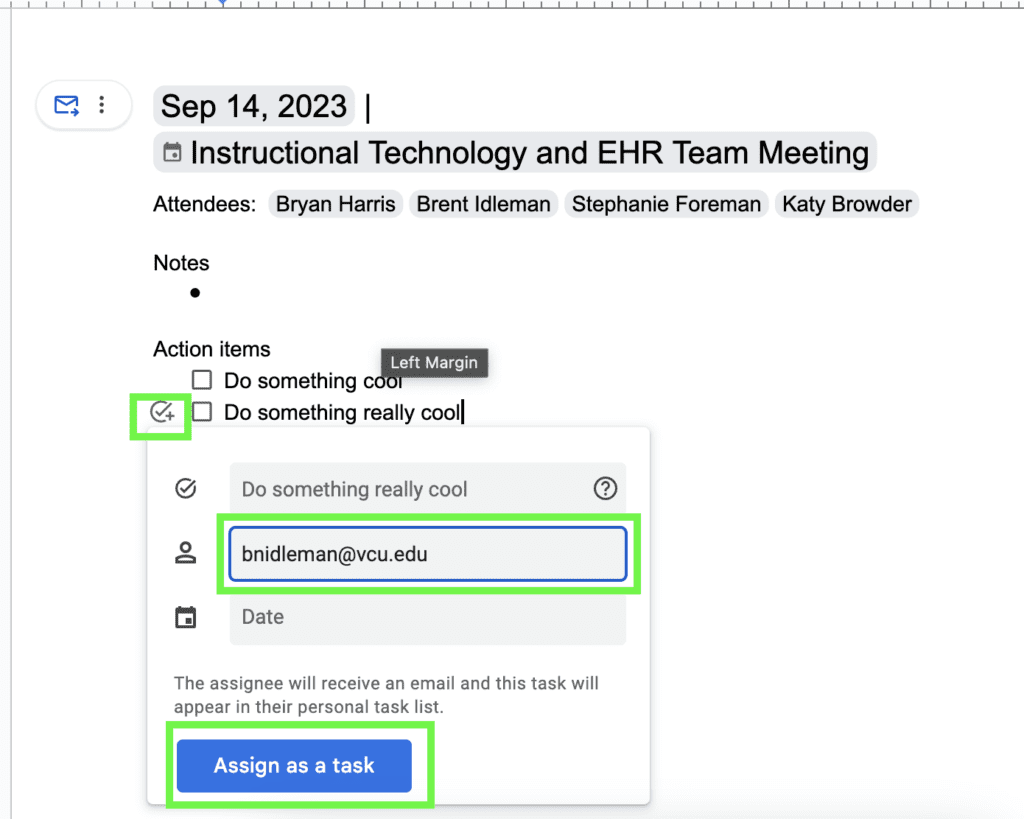
In the Notes generated for that meeting, you’ll find “Action items” section near the bottom. You can certainly add things to do and revisit the agenda to cross them off, but even cooler, you can assign someone that action item and it will automatically show in their Tasks!
Click the circle-check icon, enter the person’s name or email, and click “Assign as a task.”
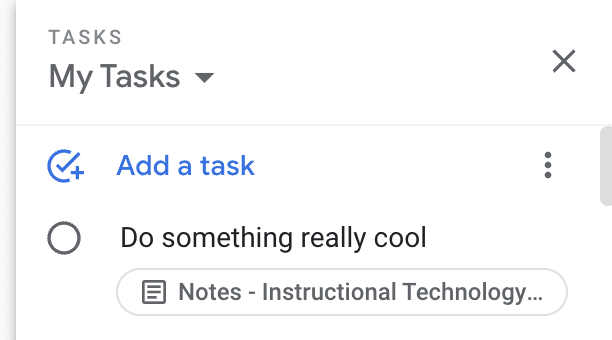
It will show in their My Tasks. We know what you’re about to ask, and yes, checking it off in either spot will cross it off the list.