Fake Text From IT…VCU IT Will Never Text You!
We are issuing a formal warning regarding a fraudulent messaging campaign currently targeting Virginia Commonwealth University students and faculty.
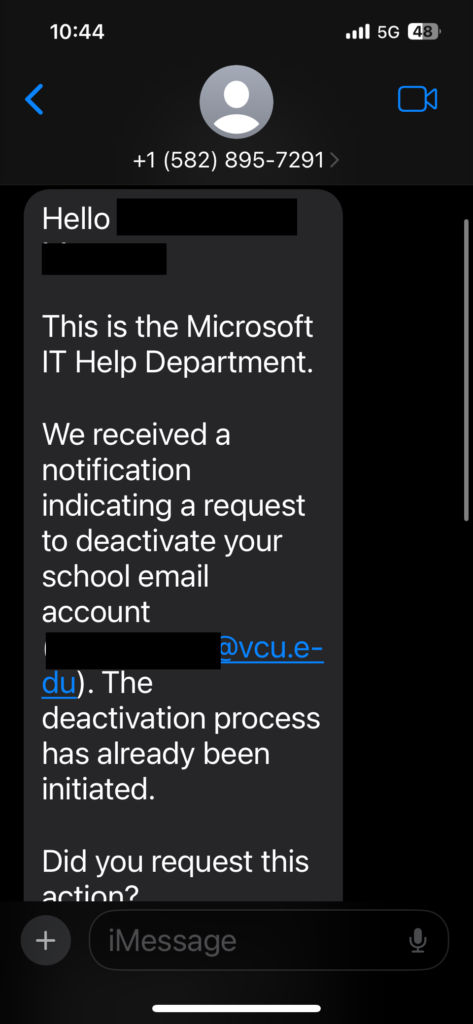
The scam involves a text message or email claiming to be from the “Microsoft IT Help Department.” The message falsely alleges that a request has been initiated to deactivate your official VCU email account and prompts you to respond or click a link to cancel the action.
Key Indicators of Fraud
To help you identify this and future threats, please note the following red flags:
- External Origin: Official VCU account notifications are never sent via SMS from personal or unverified mobile numbers.
- Misleading Branding: The message uses “Microsoft IT” to gain trust, rather than VCU Technology Services, which manages our institutional accounts.
- Sense of Urgency: The threat of immediate account deactivation is a common social engineering tactic used to bypass critical thinking and provoke a fast response.
Recommended Action Plan
If you receive this message or any communication that feels suspicious, please adhere to the following security protocols:
- Do Not Engage: Do not reply to the sender or click on any provided links.
- Protect Your Credentials: VCU will never ask for your password or Duo authentication codes via text or unsolicited email.
- Report the Incident: Please forward any suspicious emails or screenshots of text messages to [email protected]. Reporting these incidents allows the Information Security team to block malicious senders and protect the wider VCU community.
If you have already interacted with the message or provided your credentials, please change your VCU eID password immediately and contact [email protected] or the IT Support Center at (804) 828-2227.
The information security office has now activated our [email protected] inbox to be the official inbox users should report suspicious emails to. Please assist us in spreading the word that our office would now prefer the VCU Community to report suspicious emails to [email protected] instead of [email protected].