New Phishing Alert: Fake VCU Two‑Factor Enrollment Email
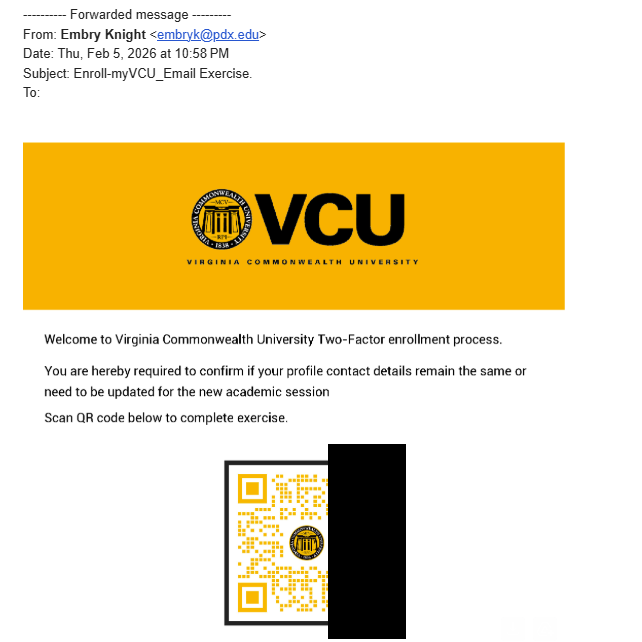
A new phishing email is circulating through our community, and this one is crafted to look highly official. Attackers are attempting to steal user credentials by imitating a “VCU Two‑Factor enrollment update,” complete with university branding and a QR code that leads to a malicious website.
VCU will NEVER ask for your personal data with a QR code.
QR codes are dominating the hacker scene right now please NEVER scan a qr code or click a link from an email you don’t recognize. Try googling more about the request first in a seperate tab.
Why This Scam Is Dangerous
Scanning the QR code or clicking any links may send you to a fake login portal designed to capture:
- Your VCU eID and password
- MFA codes
- Additional personal information
Once an attacker gains access to your account, they can attempt further compromises, send additional phishing messages, and potentially access protected data.
How to Spot This Scam
Look for these warning signs:
- Unexpected requests to “enroll,” “re-enroll,” or “update” MFA
- Messages delivered late at night or from unfamiliar names
- QR codes in unsolicited emails
- Urgent or authoritative language pressuring quick action
- Slightly altered sender addresses or formatting inconsistencies
If you did not request an MFA update, you should never receive one without official notice from VCU Technology Services.
What To Do If You Receive This Email
- Do not scan the QR code.
- Do not click any links.
- Report the message immediately by forwarding it to your security/IT contact or using the “Report Phishing” button.
- Delete the email from your inbox.
If You Already Interacted With the Email
If you scanned the code or entered any information:
- Change your VCU password immediately
- Notify Information Security right away
- Monitor your account for unusual activity