Tech Tuesday – January 9: Using Scheduler in axiUm and Brown Conference Room (Perkinson 3114)
TechTuesday
A weekly tip email from your neighborhood Instructional Technology and eHR team.
Tip #1 – You can do alot from the Scheduler in axiUm. That’s why it is my go hub for doing most actions in axiUm related to a specific clinic. If you want to activate a patient, you don’t need to go find them in the Patients search. You can right-click any appointment card>Select Patient to activate them.

If you need to bring up a patient’s card, you can do that by right-clicking>Patient Card.

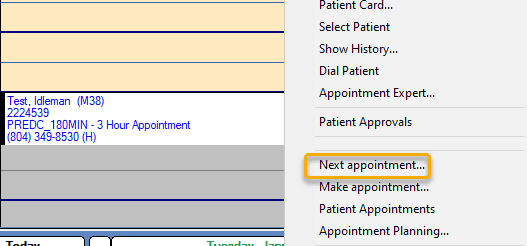
If you need to find the patient’s next appointment, right-click>Next appointment. The Scheduler will snap to the patient’s next appointment.
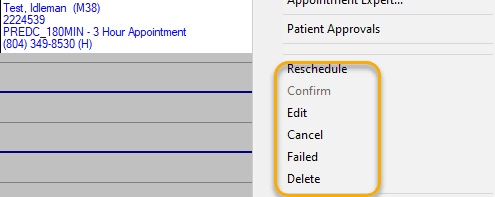
And of course, we have our commonly-used status adjustments – Reschedule, Confirm, Edit, Cancel, Failed, and Delete.
Tip #2 – Perkinson 3114, aka Brown Conference Room, is ready to be used. This room’s technology has been completely renovated. It now has a full featured lectern just like our other classrooms, two beautiful displays that can mirror or extend the dual monitor computer setup, and two new Shure ceiling microphones. We are still setting up the Echo recording capabilities, but everything else is functional, including Zoom. The display on the left is a touch screen and has a pen overlay feature. This can be used to annotate right on the screen! Look for a guide to be sent out in the near future.
