Tech Tuesday – July 30: Link to GPG Diagrams and Using Google Drive/Network Shares
TechTuesday
A weekly tip email from your neighborhood Instructional Technology and eHR team.
Tip #1 – As many of you probably know, we have new GPG groups in our Predoc clinic. Many have asked if we have diagrams of these clinics and the answer is, yes! You can find them here as well as in axiUm, under Links.

Tip #2 – Sometimes local is better; sometimes it’s worse. Locally sourced produce=good! Supporting local businesses=good! Storing data locally=not good! We all experienced the recent issue with Crowdstrike, which essentially rendered our workstations completely useless until an IT person came by and fixed your computer manually. Any locally stored files were completely inaccessible. While something like that shouldn’t happen again any time soon, it is a good prompt to improve our data management practices. One big way is by not storing data locally. By locally, I mean saving data to the actual hard drive of your workstations. These are not HIPAA compliant and in a Crowdstrike-esque scenario, completely inaccessible. Luckily, we have two places VCU SoD Data can be stored; both are HIPAA-compliant.
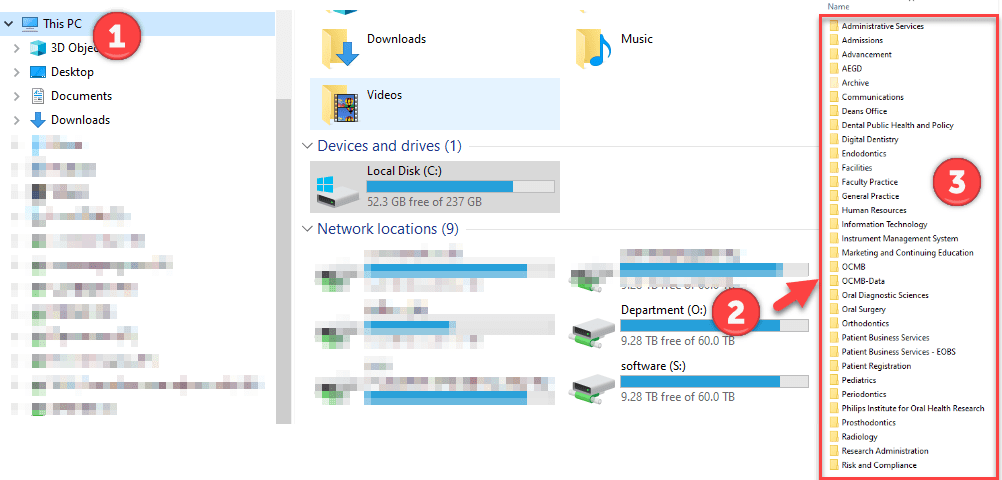
1. Networked Drives – these can be found by going to Windows File Explorer>This PC>”Department (O:)”>your department’s folder
2. Google Drive – We prefer you use a Shared Drive, but you can also store data on your VCU account Google Drive. This guide from Google will catch you up on all things possible with the Google Drive life.
Next week, we can discuss some tips related to each of these global-IT-outage-proof data storage solutions.
Categories AxiUm, Google Drive