Google Updates Recap: September 2026
Welcome to the Fall 2026 semester! This month includes several improvements in Google Calendar and in Google AI, quality-of-life features for charts in Google Sheets, an improved homepage in Google Meet, and more.
Table of contents
Google AI
NotebookLM is now Gemini Notebook
NotebookLM is now called “Gemini Notebook.” You can access Gemini Notebook from notebook.google.com, or from the old notebooklm.google.com link.
See Google’s original announcement here: NotebookLM is now Gemini Notebook.
Make a copy of a notebook in Gemini Notebook
In Gemini Notebook, you can now make a copy of an entire Notebook, including all associated sources and audio. This allows for Notebooks to be used as templates which can be shared, such as by an instructor with their students or an employee with new hires.
Notes:
- Sources: Drive-based sources are only included if the user performing the copy has permission to access and copy the original Google Drive file.
- Studio content: This includes studio artifacts like Audio Overviews, Video Overviews, Study Guides, Flashcards, Quizzes, and Slide Decks, plus artifact generation prompts and custom chat configurations.
- Personal chat history and user-generated notes are not transferred to the new notebook.
- Copied notebooks do not sync with the original, so any subsequent updates made by the original owner do not overwrite the copied version.
For more information about copying notebooks, visit: Create a notebook in Gemini Notebook.
Feature Availability: This feature is now available.
Generate interactive simulations and models in the Gemini app
Gemini can transform your questions and complex topics into custom, interactive visualizations directly within your Gemini app chat. Where previously the output of Gemini was static text and images, Gemini is now capable of results that are more interactive, such as tables, grids, and simulations.
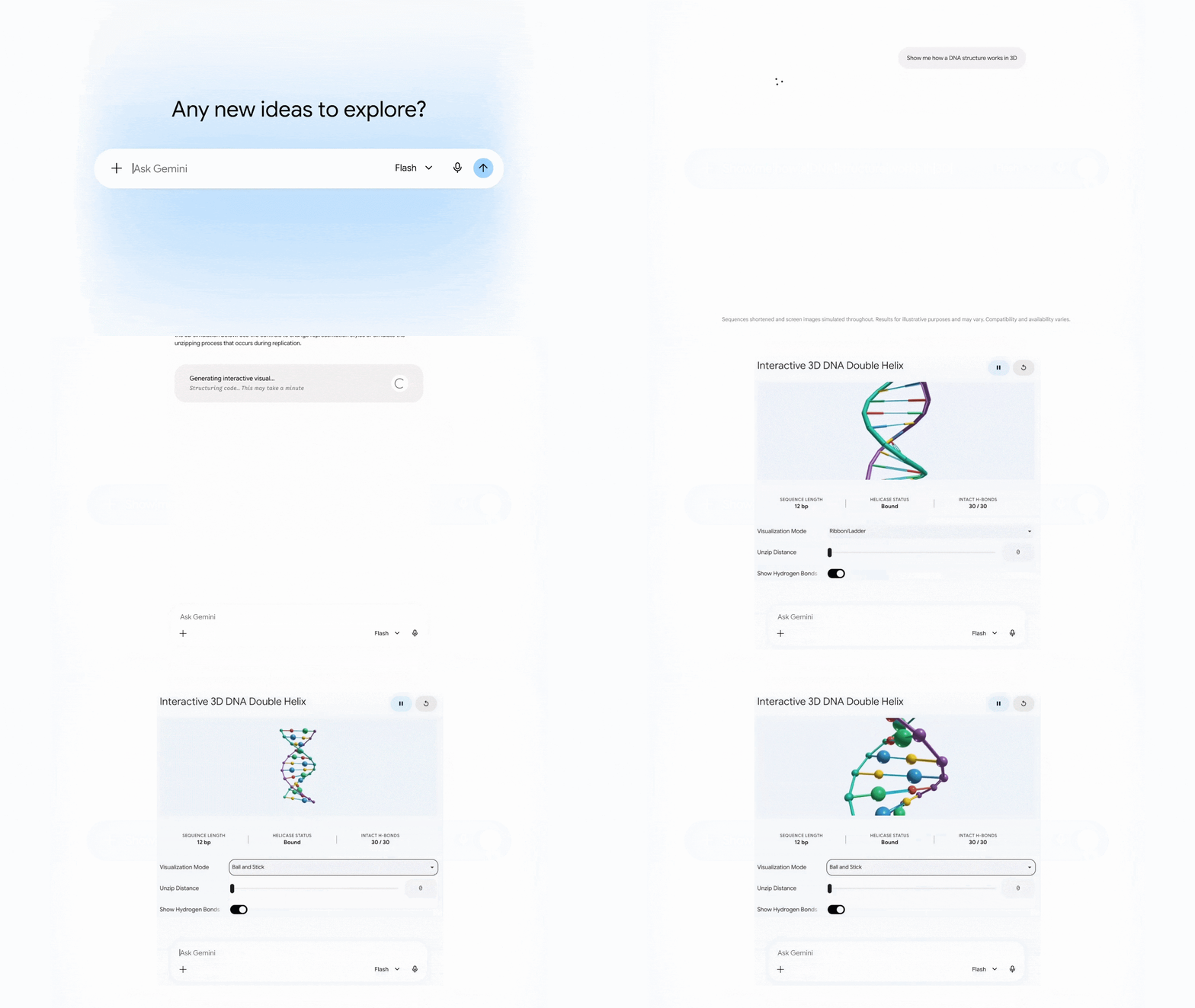
To get started, try prompting Gemini with a request starting with “Show me” or “Help me visualize”.
For more information:
- Google’s original announcement: The Gemini app can now generate interactive simulations and models.
Feature Availability: This feature is now available.
Gmail
Prevent accidental disclosures with new Reply All BCC warnings in Gmail
When replying all to an email where you were BCC’ed on the email, Gmail will now warn you to help prevent accidentally revealing you were BCC’ed on the email.
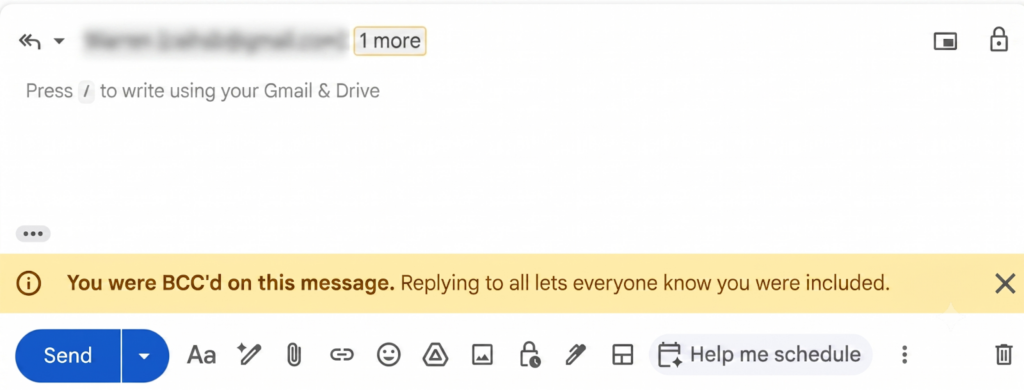
Feature Availability: This feature is now available.
Google Calendar, Tasks, & Keep
New calendar sharing permission level and changes to recurring event visibility
Google Calendar has released two new features:
- New sharing permission: “Make changes (see private events as free/busy)”
- This allows you to grant someone edit access to your calendar while keeping the details of your private events entirely hidden. This is especially useful for leaders who assign delegates to help them manage their calendars.
- Delegates assigned this restricted permission level will only be able to create, delete, and edit non-private events. Private events will appear to delegates as “busy” blocks on the calendar grid, and delegates will not be able to edit or reschedule them. In addition, private events won’t show up in any search results for delegates.
- Changes to visibility for recurring events
- Users can no longer make changes to the visibility of a single event in a recurring series. Any changes to visibility will be applied to all events in the series.
- Existing events in a recurring series will be updated to match the strictest visibility setting of any event in that series. In other words, if one event in the series is marked private but the others are not, all events in that series will be changed to private.
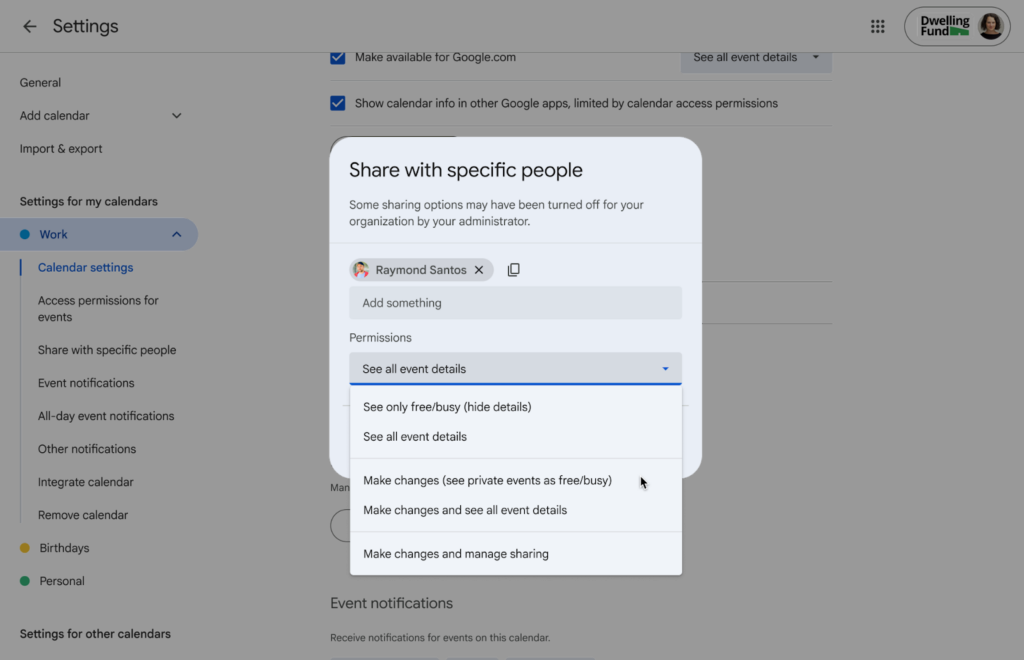
For more information about calendar sharing permissions, visit: Share your calendar – Google Calendar Help.
Feature Availability: This feature is now available.
Updated information density options to better view Google Calendar
Google Calendar now includes a new information density option “Responsive to you screen” where your calendar dynamically scales and enlarges events to fill larger monitors, which makes events easier to read.
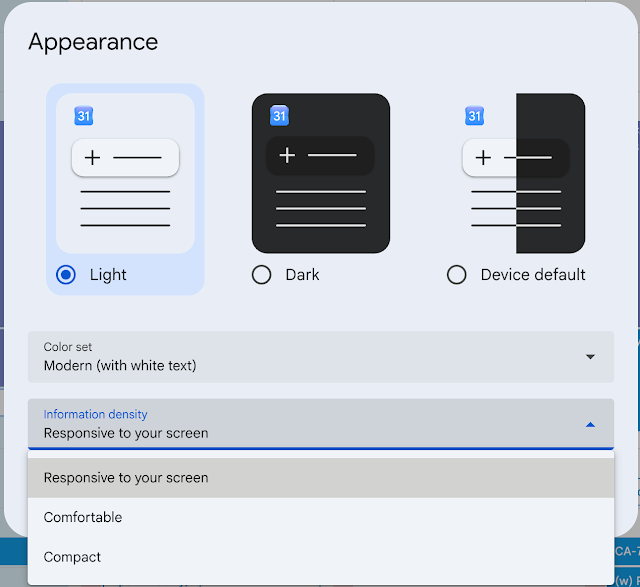
For more information, visit: Change event color set & density in Google Calendar – Google Calendar Help.
Feature Availability: This feature is now available.
Managing unsolicited event invitations with user blocking in Google Calendar
You can now protect your calendar from repeated calendar spam and unwanted invitations. When you block a user in Google Calendar, the current event is automatically removed and you no longer receive new calendar invitations from that person.
In addition, when you block an individual in Calendar, they’re added to your account-wide blocklist, and interactions across all supported Google products are blocked. Similarly, if the individual was blocked in another supported Google product, their Calendar invitations will now also be blocked.
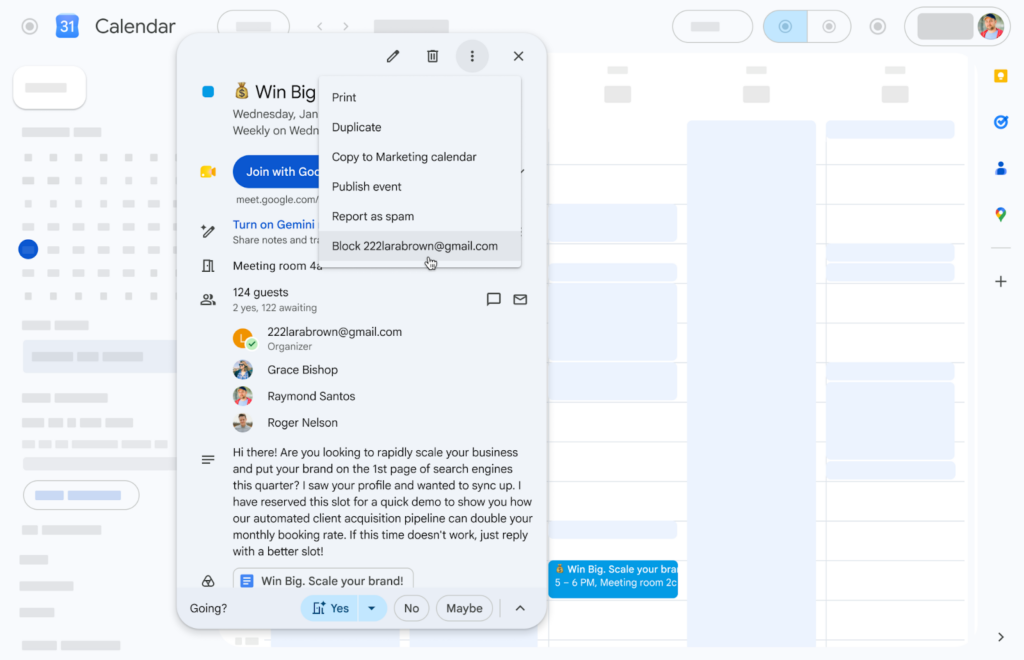
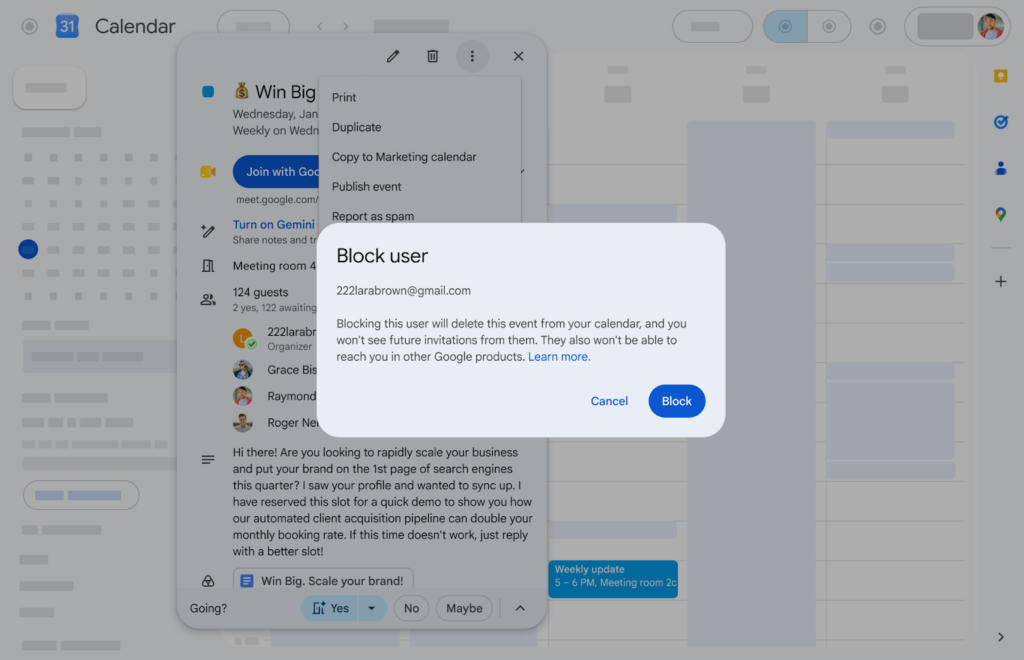
This feature allows blocking invitations from users with a Google account. To block invitations from a non-Google Calendar user, use the Gmail blocking functionality. This will block all emails from them, including emails that create Calendar events.
For more information about blocking in Google Calendar, visit: Block someone in Google Calendar – Google Calendar Help.
Feature Availability: This feature is currently rolling out.
Google Chat
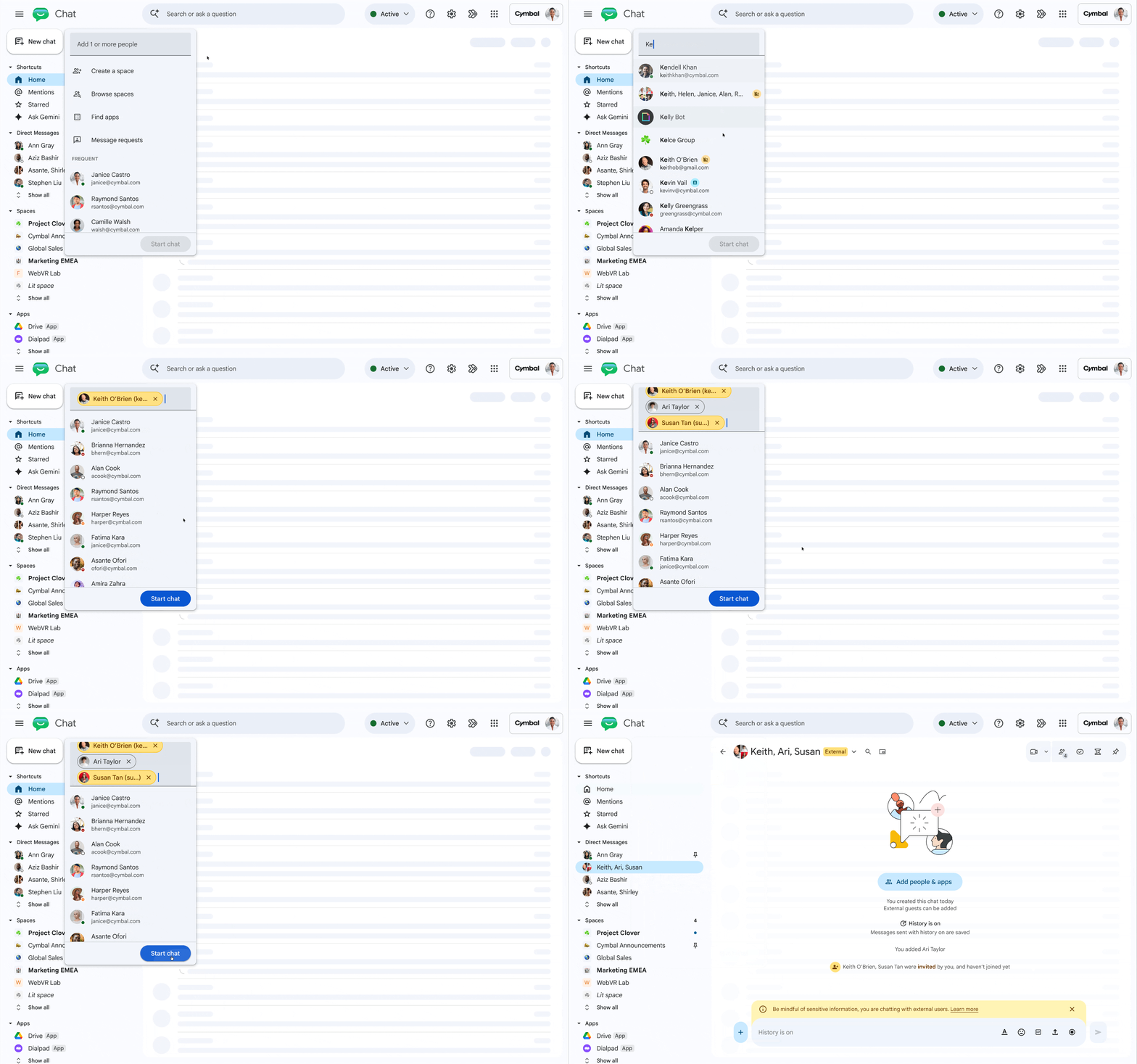
Now available: group conversations with external collaborators in Google Chat
In Google Chat, you can now have 1-to-Many (group) conversations that include external collaborators. Previously, you could only have 1:1 conversations or had to create a Space with external members enabled.
Feature Availability: This feature is now available.
Restrict who can view the member lists in Google Chat spaces
Space owners and managers can now control who can view the full list of members in a Google Chat space with a new setting, “View members” which includes the following options:
- Owners only
- Owners & managers
- All members (default)
- Entire organization
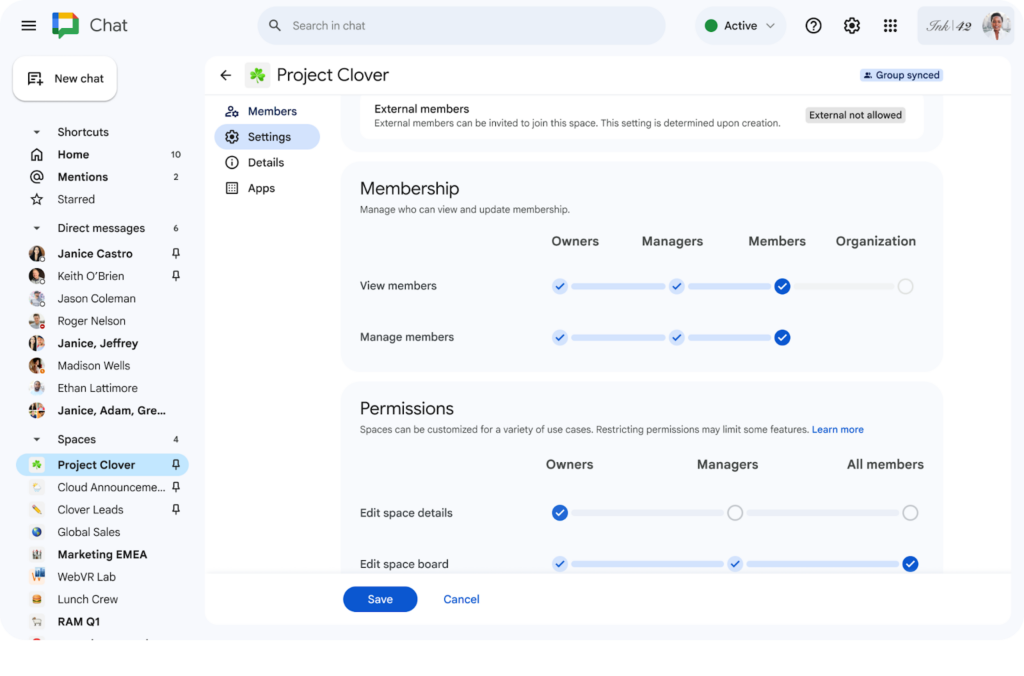
This can be useful in scenarios such as Spaces for customer scenarios (such as those involving clients, vendors, or partners) and confidential projects.
Please note that regardless of the member visibility restriction, users will always be able to see the name and profile of anyone who actively sends a message in the space.
For more information, visit: Manage view members permissions in Google Chat – Google Chat Help.
Feature Availability: This feature is currently rolling out and is anticipated to be available by September 8, 2026.
Google Drive & Docs Editors
Provide more clear, contextual feedback with timestamped comments in Google Drive videos
You can now add timestamped comments on videos in Google Drive, enabling you to provide feedback that has the context of the point in the video.
This update includes the following:
- When reviewing a video file, users can choose between adding a timestamped comment or a general file-level comment using a split button in the commenting interface.
- Each timestamped comment generates a visual marker directly on the video player timeline.
- Clicking a marker automatically jumps to that point in the video and highlights the associated comment, allowing reviewers and video owners to navigate feedback without manually scrubbing through media files.
- Standard commenting capabilities—such as editing, resolving, replying, and mentioning colleagues with @ notifications—remain fully supported and integrated with time-anchored notes.
Note also that mobile users will not be able to create comments, but will be able to see all of the comments left on a video, including timestamped comments.
For more information, visit: Store & play video in Google Drive.
Feature Availability: This feature is now available.
Google Meet
A centralized hub for meeting resources on the new Google Meet homepage
Google Meet is introducing a new homepage, where you can now find more than just your upcoming meetings. This new hub will allow you to:
- Quickly access meeting descriptions and calendar attachments for upcoming calls.
- Find meeting notes, recordings, and transcripts from past meetings without digging through your inbox or Drive.
- Use the new week and month navigators to look ahead at your schedule or revisit previous discussions.
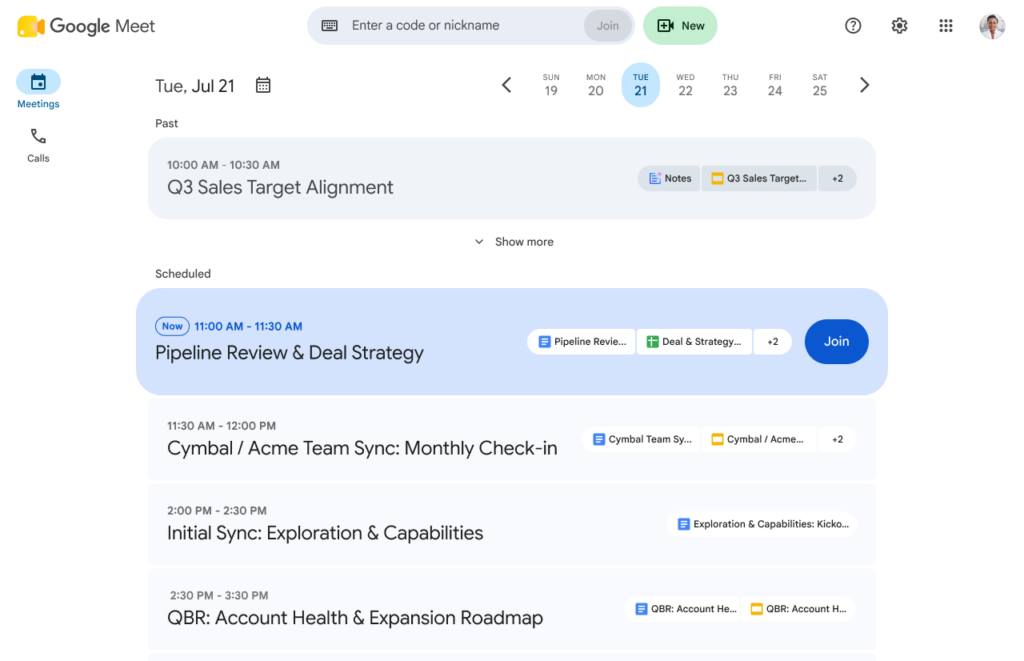
To get started, just visit meet.google.com to see the new homepage.
Feature Availability: This feature is now available.
Google Sheets
Import and create combo charts in Google Sheets
Google Sheets now supports combo charts. Combo charts allow for the visualization of different formats of data, such as $ and %, that are correlated. You can now create the following types of charts:
- Clustered Column – Line
- Clustered Column – Line on Secondary Axis
- Custom Combo
Sheets combo chart support also comes with enhanced Microsoft Excel import compatibility. Previously, importing external files that contained combo charts with a secondary axis would result in the secondary axis being dropped. This update ensures that secondary axis configurations and combo chart types are preserved during file import.
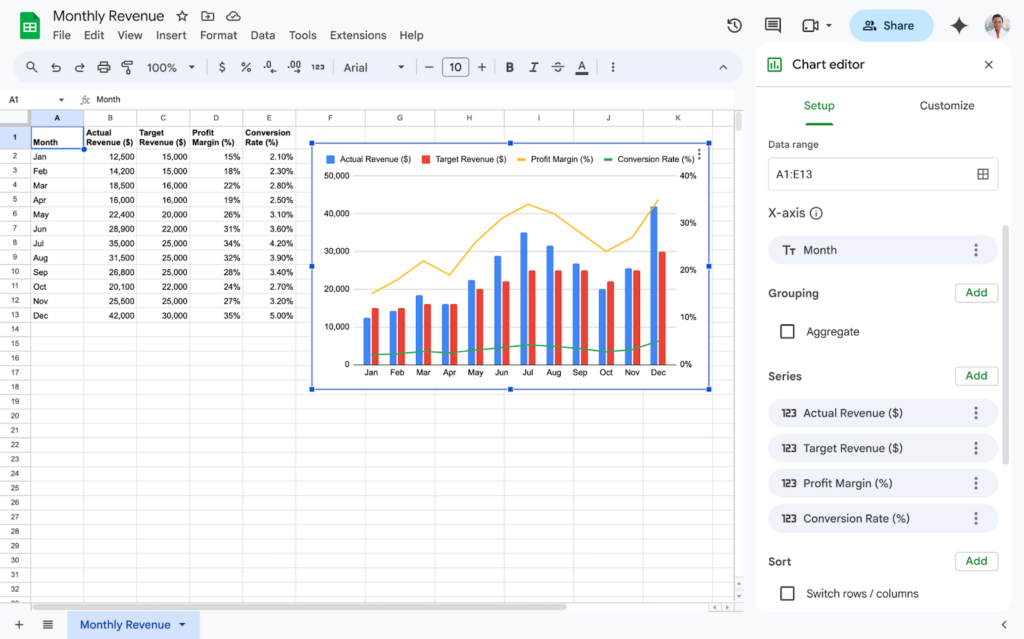
For more information about creating and using charts in Sheets, visit: Add & edit a chart or graph – Google Docs Editors Help.
Feature Availability: This feature is now available.
Improved file importing in Google Sheets with tables and linked pivot tables
Google Sheets is introducing two key improvements in Google Sheets that preserve formatting and linked data when converting files from Microsoft Excel.
- Excel tables will now seamlessly import as Sheets tables.
- Sheets now fully supports importing Excel pivot tables that are backed by table ranges.
Previously, when converting Excel files, Excel tables did not import as Sheets tables, causing users to miss out on the structural and formatting benefits of tables, and pivot tables linked to tables were replaced with static grids. These updates ensure your data structures remain intact and beautifully formatted upon import. Most importantly, your imported spreadsheets will be ready to use right away, no manual reconstruction needed.
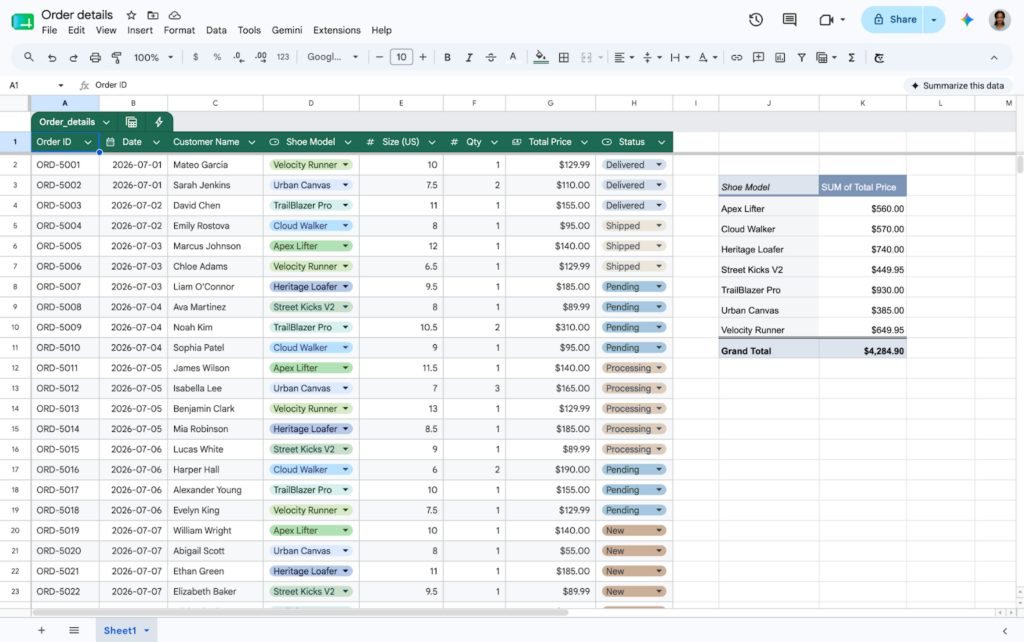
For more information, visit:
- Use tables in Google Sheets – Google Docs Editors Help
- Create & use pivot tables – Google Docs Editors Help
Feature Availability: This feature is now available.
Create and import scatter charts with multiple x-series in Google Sheets
Google Sheets now supports creating and editing scatter charts with multiple independent x-series. This update allows users to map separate data series to their own unique x-axis, rather than forcing all series in a single chart to share the same horizontal axis domain.
Additionally, this feature improves import and export compatibility with Microsoft Excel. Previously, importing Excel files with multiple x-series scatter charts into Google Sheets would drop the extra axes and revert to a single x-axis. Now, these configurations are accurately preserved when moving spreadsheets between platforms.
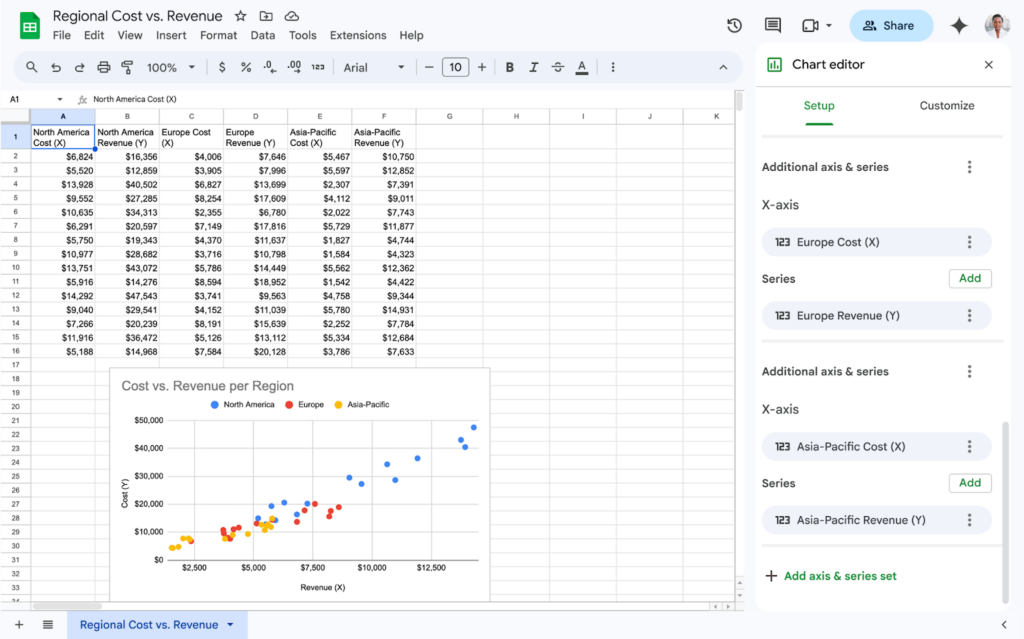
For more information, visit: Add & edit a chart or graph – Google Docs Editors Help.
Feature Availability: This feature is now available.
Categories Gmail, Google Calendar, Tasks, and Keep, Google Chat, Google Drive & Docs Editors, Google Feature Updates and Changes, Google Meet, Google Sheets, Google Workspace News, Other Google Feature News