Don’t Forget the Final Step: Ensuring Your Independent Contractor Gets Paid!
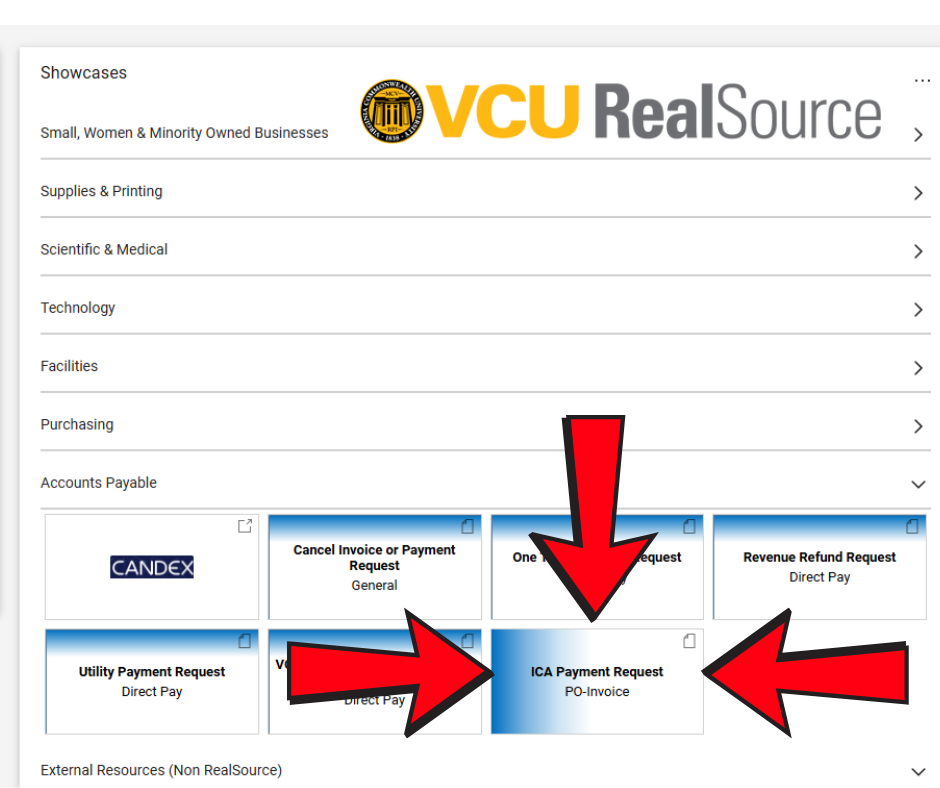
You’ve carefully qualified your recipient, ensured they’re set up in RealSource, and completed the all-important Independent Contractor Agreement (ICA) form. You’ve even created the purchase order and received the services. Fantastic! But there’s one crucial step that often gets overlooked, and it’s the most important step of all: submitting the ICA Payment Request form in RealSource.
This final action is what triggers the payment process and ensures your independent contractor receives their hard-earned compensation. Without it, your vendor won’t get paid, and all your previous efforts will be for naught.
Why is this step so critical?
The ICA Payment Request form acts as the official confirmation that the services have been completed and are ready for payment. It’s the key that unlocks the financial transaction.
A Quick Reminder of the Process:
- Qualify Your Recipient: Double-check that your recipient meets all the necessary criteria. Remember to consult the Global Education Office website for specific instructions and forms if dealing with a non-resident alien.
- Vendor Setup: Ensure the independent contractor is correctly set up in both eVA and RealSource.
- Complete the ICA Form Before Services Begin: This form, signed by both the department and the vendor, is essential. Remember to include accurate information like the vendor’s full legal name, Banner ID (V#), and address as listed in Banner. Find the ICA form in the “Related Documents” section of the relevant webpage.
- Create a Purchase Order in RealSource: Use the Non-Catalog Item Requisition Form, selecting “Independent Contractor” as the Requisition Type. Crucially, attach a PDF copy of the fully executed ICA as an Internal Attachment to the requisition and select “Yes” when asked if you attached the ICA form. The PO amount should reflect the total contract amount.
- Receive in RealSource: Once services are complete, remember to receive them in RealSource.
- Submit the ICA Payment Request Form: This is the final and most important step. Locate the “ICA Payment Request” form in the RealSource Accounts Payable showcase and submit it promptly.
Don’t let your hard work go to waste! Take the extra few minutes to complete the ICA Payment Request form. It’s the best way to show your appreciation for the services provided and maintain a positive working relationship with your independent contractors.
Categories Procurement Services