Canvas Feature Updates – May 2025
New Quizzes – Text Block
Production Environment Availability: 5/17/2025
In New Quizzes, instructors are able to provide students additional context with standalone text or prompts that are not tied to questions on a New Quiz. This update allows instructors to add sections to their quizzes that do not require a question to include instructions or other information to guide the student. In addition, it also improves ease of migration from Classic Quizzes to New Quizzes.
To add a text block to a quiz, click the Add button in a quiz.

Click the Text Block button.

In the Title field [1], add a text block title. In the Content field [2], add Text Block content using the Rich Content Editor. To add content to an item bank, click the Add to Bank button [3].

Discussions – Permalink for Discussion Entries
Production Environment Availability: 5/17/2025
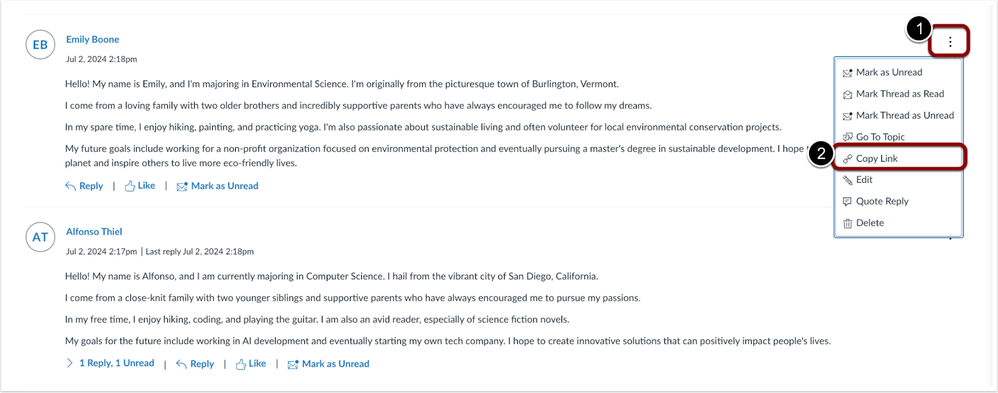
In Discussions, each reply includes a copyable permalink allowing users to share a direct link to that specific reply. If the reply is part of a thread, the thread will expand to reveal it. This update makes it easier to navigate and reference specific replies in a discussion.
Click the Options [1] icon, then select the Copy Link [2] option to copy the permanent link.
New Quizzes – Enhanced Moderation Tools and Interface Updates
Production Environment Availability: 5/21/2025
Several updates to the New Quizzes Moderate Page enhance the instructor’s ability to manage accommodations during active quiz attempts:
- Instructors can add time to an active quiz attempt when moderating a New Quiz.
- In the New Quizzes Moderate Page:
- The modal is renamed to Course Accommodation and the description is updated.
- The student’s name is relocated to the body text.
- A checkbox is added to apply changes to the current quiz in-progress attempt.
- The Moderation tray is renamed to Current Quiz Accommodation with an updated description and includes the student’s name in the body text.
These updates provide a more consistent and user-friendly experience for instructors. Note: The Apply these changes to the current Quiz and attempts as well checkbox is enabled by default.
In the moderation modal, the header is renamed [1], the student name is relocated to the body text [2], the description is updated [3], and an Apply these changes to the in-progress attempts as well is available [4].

In the Moderation tray, the header is renamed [1], and the student name is relocated to the body text [2], and the description is updated [3].

Rich Content Editor – Removal of Resize Icon from RCE Text Box
Production Environment Availability: 5/21/2025
In the Rich Content Editor, the draggable resize icon is removed. Users can continue to use the Fullscreen icon to expand the editor as needed. This update improves accessibility by eliminating a feature that can be difficult to use with assistive technologies or limited motor control, while still providing an accessible alternative through the Fullscreen option.
Categories Canvas