Google Updates Recap: May 2024
Table of contents
- Important Notices
- Google Chat
- Google Drive & Docs Editors
- Hover to preview videos in Google Drive
- View recent shares in the Google Drive Activity page
- Updated keyboard shortcuts and first-letters navigation now available on Google Drive web
- Preview files in Google Drive with new hovercard feature
- Stay on top of shared Drive files with automatic digest emails
- Google Meet
- Google Sheets
- Google Slides
Important Notices
Jamboard is winding down
Google has announced that Jamboard, their collaborative whiteboarding tool, is winding down. Jamboard files will become view-only beginning October 1, 2024, and after December 31, 2024, Jamboard will no longer be accessible and all Jamboard files will automatically be converted to a PDF format.
Notice emails will be sent from [email protected] to Jamboard users beginning this week with steps to take before October 1, 2024.
For any questions, please email us at [email protected].
Google Chat
Get notifications for all messages in a Google Chat space
In Google Chat Spaces, you can currently control what notifications you receive to ensure you are being notified for what’s relevant to you. However, some Spaces may necessitate getting all new notifications, such as in customer support or operational issues.
Now, you can choose to be notified of all new messages and threads in a Space by selecting the “All” notifications option for your desired Space(s).

For more information about customizing Chat notifications, visit: Turn Google Chat notifications on or off – Android
Feature Availability:
- Mobile devices: This feature is now available.
- Web: This feature is currently rolling out and is anticipated to be available by June 19, 2024.
Google Drive
Hover to preview videos in Google Drive
When hovering over recognized video files in Google Drive, a small preview window will appear and will automatically begin playing the video. Options for turning captions on or off and turning sound on or off will also appear in the corner of the preview. Clicking on the video will open it in full screen.

For more information about, visit: View & reorder your files and folders – Computer – Google Drive Help
Feature Availability: This feature is currently rolling out and is anticipated to be available by June 19, 2024.
View recent shares in the Google Drive Activity page
In the Google Drive Activity section, you will now see updates about when a file was shared with you and when.

For more information, visit: Check activity & file versions – Computer – Google Drive Help
Feature Availability: This feature is now available.
Updated keyboard shortcuts and first-letters navigation now available on Google Drive web
Google Drive has gained additional accessibility features to create a more accessible experience.
First-letters navigation enables users to quickly and easily navigate a list of items in Drive via keypress. Users can move focus within a file list in Drive by pressing the first letter(s) of the file’s name. Pressing the same letter again will navigate to the next item starting with that letter.

Note that since this feature uses the individual letters on your keyboard to select items, any single-key shortcuts will be converted to multi-key shortcuts.
You can opt into the new Drive keyboard shortcuts by navigating to Google Drive, then go to Settings → Keyboard shortcuts → Update now. On August 1, 2024, anyone who has not updated will be migrated automatically.
Once shortcuts are updated, you will also be able to see shortcuts where applicable in menus and on hover in toolbars in Drive.
For more information, visit: Keyboard shortcuts for Google Drive on the web – Android. You can find the full list of Drive keyboard shortcuts by going to Settings → Keyboard shortcuts in Google Drive.
Feature Availability: This feature is now available.
Preview files in Google Drive with new hovercard feature
In Google Drive, you can now more easily preview files through hovercards. When you place your cursor over a file icon in Google Drive on the web, a hovercard will appear with a thumbnail of your file and other relevant information, such as file type, file owner, who recently modified the file and when they last modified the file.

Feature Availability: This feature is currently rolling out and is anticipated to be available by June 14, 2024.
Stay on top of shared Drive files with automatic digest emails
Google Drive will now send helpful digest emails about files that have been shared with you if you have not been active in Google Drive for 7 days and multiple files have been shared with you.
The digest email will include information about the unviewed files that were shared with you and a link to “See more activity” on the Drive Activity page.

To adjust your settings for the email digest, go to your digest email → scroll to the footer → click on “unsubscribe here”. You can also do this by going to drive.google.com → Settings → Notifications → “Get summaries about recent files shared with you via the Drive digest”.
Feature Availability: This feature is currently rolling out and is anticipated to be available by June 25, 2024.
Google Meet
Seamlessly transfer between devices during a Google Meet call
Sometimes, you may need to join a Google Meet from your mobile device while you’re heading to your computer, such as if you’re running late or your computer suddenly requires updates and has to restart.
Now, when you switch from your mobile device to your computer, Google Meet will recognize you are already in the meeting and a button will provide the option to “Switch here,” so you no longer have to leave the meeting from your phone after you’ve joined the Meet via the computer.
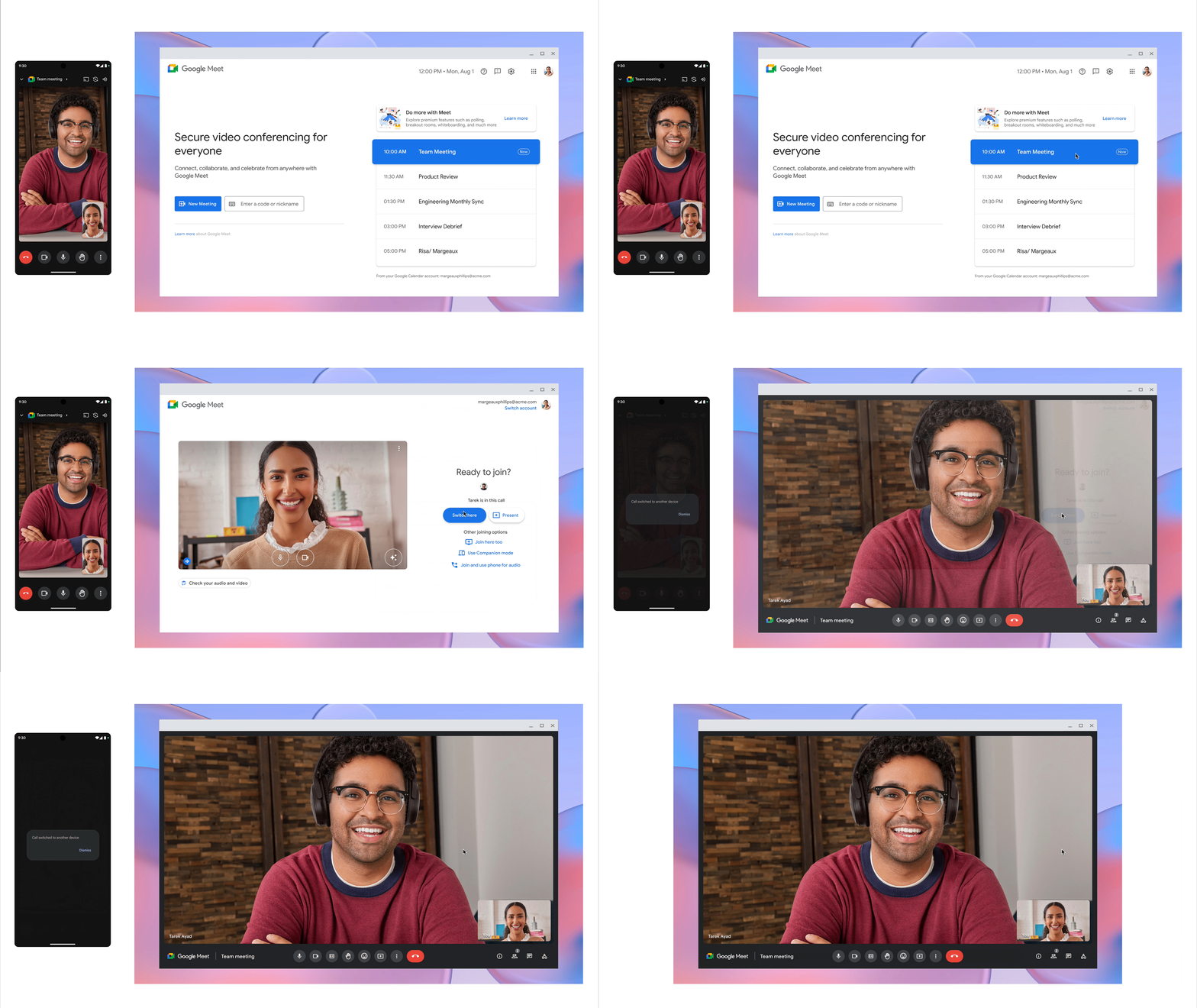
Note that this transition only works from mobile device to computer. If you are switching from computer to mobile device, you won’t see the “Switch here” option. Additionally, the existing options to Present or join using companion mode will remain and will not remove your mobile device from the meeting. Google Meet also won’t recognize if you’ve joined the meeting via phone call, so you’ll need to hang up after you join from your computer.
For more information about transferring a meeting between devices, visit: Transfer a meeting between devices – Google Meet Help.
Feature Availability: This feature is now available.
Google Sheets
Easily convert data to dropdown chips in Google Sheets
In our March 2024 features post, we announced a new feature in Google Sheets for quickly inserting preset dropdown chips that were useful for a variety of general situations, such as project status, yes/no, and priority.
Now, when Google Sheets detects a column that could be easily converted to dropdown chips, a suggestion will be displayed that you can accept or reject to automatically convert the cells in that column to dropdown chips.

To see dropdown chip suggestions, the option for “Enable dropdown chip suggestions” must be selected. This feature can be turned on or off by going to: Tools → Suggestion controls → Enable dropdown chip suggestions.
For more information about inserting smart chips, visit: Insert smart chips in your Google Sheets – Google Docs Editors Help.
Feature Availability: This feature is anticipated to be available by July 9, 2024.
Google Slides
Expanding Slides recordings to Microsoft Edge
In our previous blog post, we announced that Google Slides presentations could have a recording attached to them of a recorded presentation, allowing anyone to view the presentation at their own time. This feature was only officially supported on Google Chrome.
Now, users of the Microsoft Edge browser can also create and attach presentation recordings.
For more information about Slides recordings, visit: Use slides recording in Google Slides.
Feature Availability: This feature is now available.
Categories Google Chat, Google Drive & Docs Editors, Google Feature Updates and Changes, Google Meet, Google Sheets, Google Slides, Google Workspace News, Other Google Feature News