Zoom Workplace version 6.4.0 Required for Participation in VCU Zoom Meetings
Starting Thursday, June 5, Zoom Workplace version 6.4.0 will be the minimum software version allowed for participation in VCU-hosted Zoom meetings and webinars. This change is occuring in response to several serious security vulnerabilities identified in earlier Zoom client versions.
Once the new rule is in place, version 6.4.0 or greater will be required for all Windows, MacOS, Linux, iOS and Android users. Users attempting to start or join a meeting from a version older than 6.4.0 will see a prompt to update their software before proceeding.
Updating Zoom is typically a quick and easy process, but in order to avoid any inconvenience you may wish to take a moment to upgrade before this rule takes effect. As a reminder, you can verify your current software version by opening the Zoom desktop app, then clicking on your profile picture (or initials) at the top right of the application window and choosing “Help > About Zoom Workplace” from the pull-down menu.
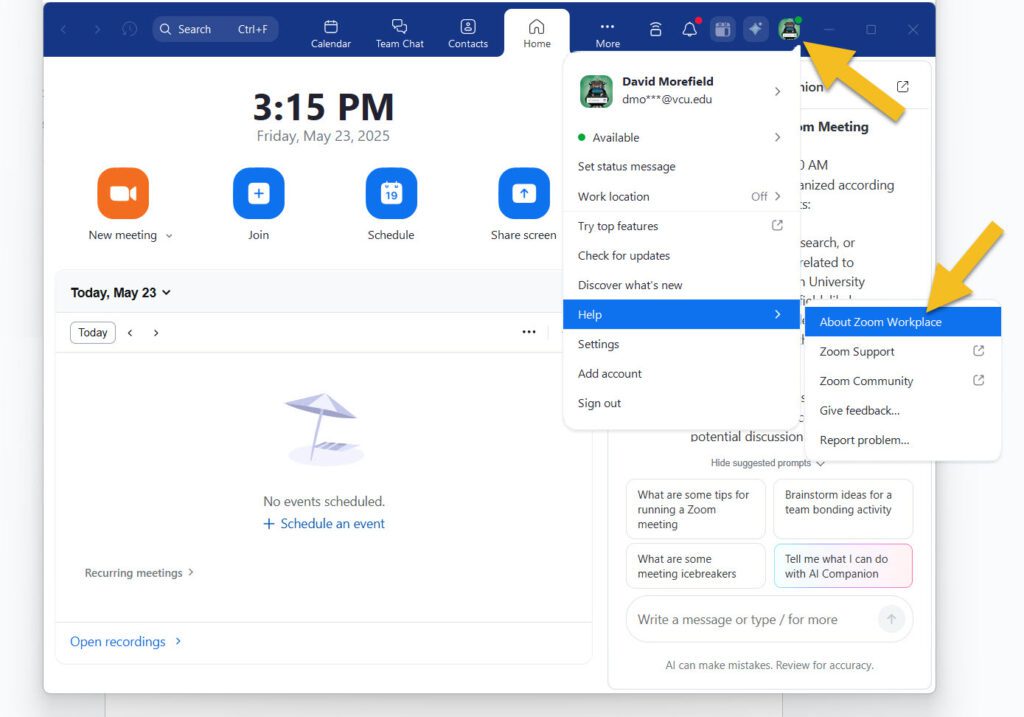
Or you can choose “Check for updates” from the same pull-down menu and Zoom will tell you if a newer version is available. As long as you’re at 6.4.0 or higher, no further action is necessary, but feel free to update to the very latest version, 6.4.10 if you’re not already there.
The latest software version can also be downloaded and installed from https://zoom.us/download.
Keep in mind that if you lack admin privileges on your university-owned device, you may need help from your department’s desktop support team to complete the install. Also note that if necessary, you can use the “Join from your Browser” option to bypass the desktop client entirely and deal with the upgrade process at a more convenient time.

Thank you for helping us keep VCU Zoom safe and secure for all users. As always, please feel free to contact the Zoom team at [email protected] with questions or concerns.
Categories announcements, security