Canvas Feature Updates – May 2026
New Quizzes – Default Font Setting
Production Environment Availability: 5/6/2026
An Edit default font toggle is available in New Quizzes settings, allowing instructors to set a default font and font size that automatically applies to all Rich Content Editors within the quiz. Automatically applies global styling to quiz content, ensuring a consistent look and reducing the need for manual formatting across multiple questions.
Notes:
- The Edit default font toggle is disabled by default.
- When enabled, content with individually set font styles remains unchanged.
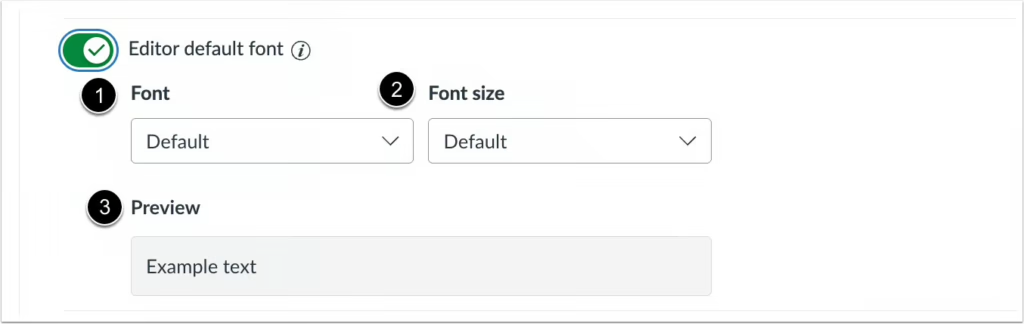
When the Editor default font toggle is enabled, instructors can:
- Select the desired font [1]
- Select the desired font size [2]
- Preview an example [3]
SpeedGrader – Current Student Indicator
Production Environment Availability: 5/20/2026
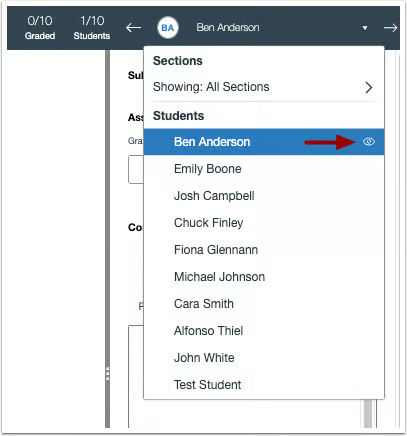
In SpeedGrader, the student drop-down menu includes an indicator showing which student is currently being viewed. Helps instructors quickly identify the currently selected student in SpeedGrader, making it easier to navigate submissions and reducing confusion when switching between students.
An indicator displays the currently viewed student name.