Canvas Feature Updates – March 2026
Discussions – Enhanced Rubrics Support
Production Environment Availability: 3/11/2026
When Enhanced Rubrics is enabled, rubrics in Discussions use the enhanced experience instead of the classic rubrics. This update makes grading consistent across Canvas.

Course – IgniteAI Image Alt Text Generation in Course Accessibility Checker
Production Environment Availability: 3/21/2026
AI-powered remediations in the Accessibility Checker support fixing missing image alt text when the IgniteAI Accessibility Remediation for Courses feature option is enabled at the root account level.
This feature reduces the time spent on accessibility remediation by using AI to generate alt text for hosted images in bulk from a central location.
In the Issue tray, when alt text is missing, instructors can manually enter a description [1] or generate one using AI [2]. Once satisfied, click the Apply button [3].

New Quizzes – Survey Results Visibility
Production Environment Availability: 3/21/2026
In New Quizzes Survey Reports, instructors can click the response count to view a list of students who selected a specific answer. For anonymous surveys, student identities are masked as Student 1, Student 2, and so on to ensure privacy. This update enhances visibility into student engagement and feedback patterns, improving clarity when reviewing survey results and supporting fair assessment practices.
In the Reports tab, instructors can click the response link to view individual student responses.
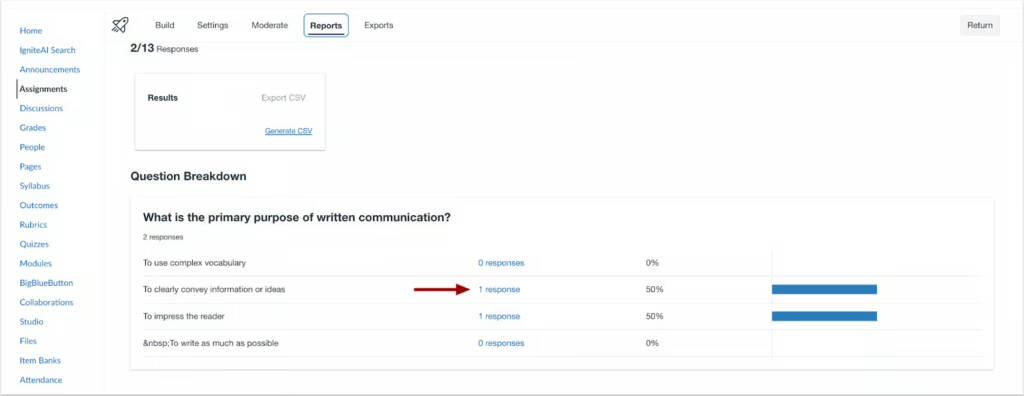
In anonymous surveys, participant names display as Student followed by a number.

New Quizzes – Export Survey Response
Production Environment Availability: 3/21/2026
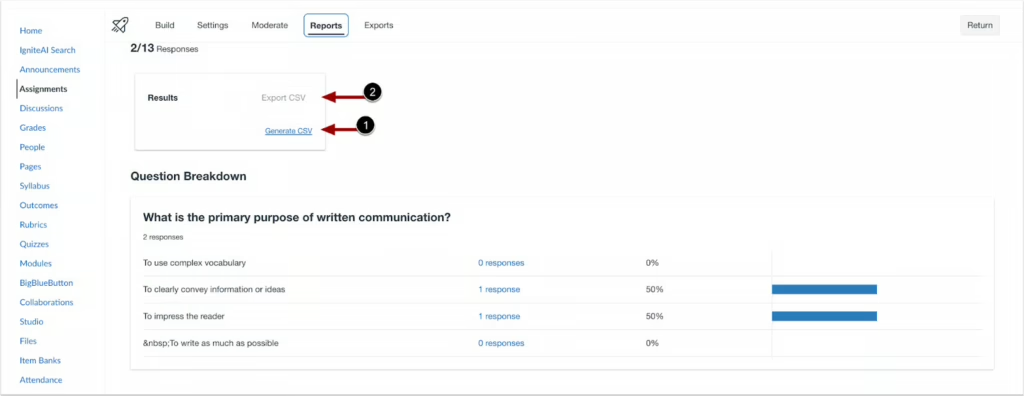
Instructors can export survey responses to a CSV file. The file includes respondent name for non-anonymous surveys, submission timestamp, question text, and all answers for every question type. For anonymous surveys, student name and ID are excluded or marked as Anonymous to protect privacy.
To download a CSV file of a survey’s results, click the Generate CSV link [1], then click the Export button [2].
Analytics – Course Analytics Performance in Large Courses
Production Environment Availability: 3/25/2026
Summary
Course Analytics supports very large courses, including those with up to approximately 100,000 enrollments.
- In large courses, loading times may be slower than in smaller courses.
- Data visualizations and data tables are available across all analytics tabs for all courses.
- For courses with more than 100,000 enrollments, some browsers may display a message indicating that the page script is taking a long time to respond.
- If this message displays, selecting Wait allows the analytics page to continue loading.
- The maximum course size that may affect loading performance has not yet been fully determined.
Note:
When a Message Students Who message includes more than 2,000 recipients, the recipient list does not expand.
- The total recipient count displays in place of the expanded list.
- Messages can still be sent to all recipients.
- Individual recipients cannot be viewed or removed from the list when the recipient count exceeds 2,000.
Change Benefit
- Improved Course Analytics Access: Allows analytics data, visualizations, and tables to load for courses with very high enrollment counts.
Courses – IgniteAI Table Caption Generation
Production Environment Availability: 3/25/2026
AI-powered remediations in the Accessibility Checker support fixing table captions when the IgniteAI Accessibility Remediation for Courses feature option is enabled at the root account level.
Change Benefit
- Faster Table Captioning: Writing captions for every table manually can be time-consuming.
- AI-Generated Captions: AI can generate table captions automatically, helping resolve accessibility issues faster.
Follow these steps to generate and apply a table caption:
- Click the Generate button to create a table caption [1].
- Review the suggested caption [2].
- Click the Add caption button to apply it [3].
