AI in Education: Research Tools

Currently, AI is a big topic in today’s public discourse. You might know tools like ChatGPT, Copilot, Gemini, or Claude. This blog will introduce some new tools that can help you and your students’ find, evaluate, and understand peer-reviewed research articles.
Finding Research
In terms of AI, it’s the wild west! New tools are being introduced everyday. In this section, we provide a current list of AI-powered search engines built specifically to search peer-reviewed literature. These tools can help you and your students find current and relevant research.
All of these tools have free plans, however, some of the free plans limit use or features.
Consensus. Users input a research question, and Consensus finds, aggregates, and extracts data from relevant studies to provide a summary or a “consensus” on the topic.
Elicit. Users can enter research questions or hypotheses, and Elicit pulls up relevant academic papers, displaying key elements such as abstracts, methodologies, and results. It also supports ranking papers based on how they answer the user’s query.
Scit. Provides insights into whether citations of a paper support, dispute, or just mention the findings of that paper. This helps users discern the quality and credibility of the paper.
Research Rabbit. Users start with a few papers or authors of interest, and Research Rabbit generates a network map of related research, suggesting similar papers, co-authors, and potential new topics. The visual approach makes it easier to see connections and gaps in the literature.
Connected Papers. Users start by entering a paper of interest, and Connected Papers generates a visual graph where the nodes represent papers, and the connections (edges) indicate their relationship. The graph uses co-citation and bibliographic coupling to show how closely papers are conceptually connected, allowing users to easily explore similar or foundational work.
Evaluating and Understanding Research
After students find relevant research articles, they need to evaluate the findings.
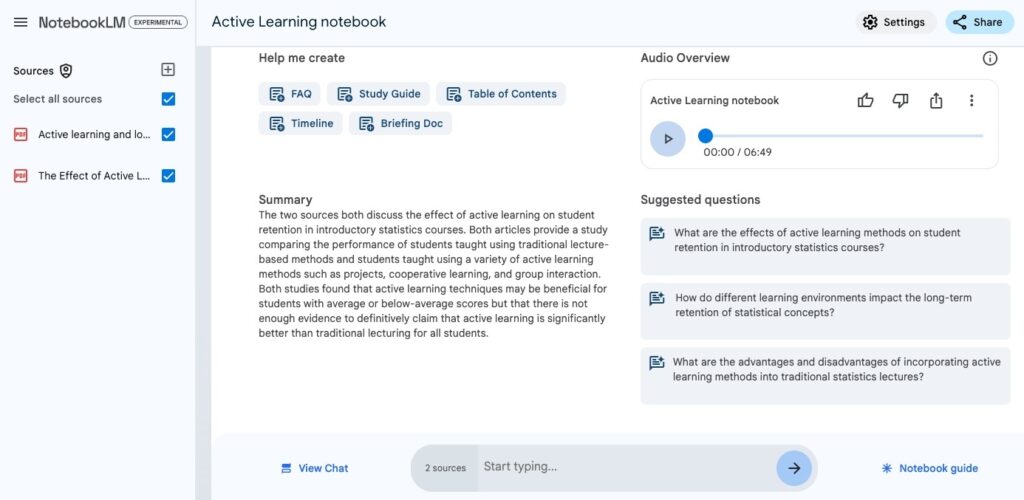
Notebook LM can act as a study assistant and can help students understand the major findings.
Google’s Notebook LM is a virtual research assistant built on Gemini. Faculty and students can create notebooks to ground the AI responses in their materials. NotebookLM generates a personalized guide through the document(s), such as an FAQ, Study Guide, Timeline, or Briefing Guide.
This month Google introduced Notebook LM’s Audio Overview. Two AI hosts create a personalized podcast about your document(s). They summarize your material, make connections between topics, and banter back and forth. The length of the podcast varies depending on how many articles you upload but generally stay between 6-15 minutes in length. You can download the podcast to embed in a Canvas course.
The Audio Overview podcast offers a multi-sensory learning experience which aligns with Universal Design for Learning (UDL) principles. The auditory format can benefit learners with diverse needs, including those who may struggle with reading comprehension.
To try out Audio Overview, follow these steps:
- Go to NotebookLM.
- Create a new notebook.
- Add at least one source.
- In your Notebook guide, click on the “Generate” button to create an Audio Overview.
ChatGPT and ChatPDF can extract and summarize information from an uploaded document or multiple documents. These tools can also act as a reading assistant answering questions about the document. Of course, the more thoughtful the question, the deeper and more detailed the answer will be.
AI tools can help find, evaluate, and understand academic research. This blog post introduced a selection of AI-powered tools designed to help faculty and students easily search for peer-reviewed research, evaluate credibility, and understand complex information. These tools make research easier and more accessible for faculty and students. Try them out to see how they can enhance the research process and support diverse learning needs.
Categories AI, article