Canvas Feature Updates – December 2025
Modules – Bulk Unpublish Supports Simple Published Files
Production Environment Availability: 12/3/2025
Files are unpublished through the Unpublish Module and All Items feature when in a simple published state with no other restrictions. Other availability states, such as scheduled availability or link-only, remain published. Previously, all files remained published regardless of their state. This update allows faster management of published files in bulk while preserving complex availability settings, reducing manual effort for content adjustments.
Settings – Feature Options are Sortable
Production Environment Availability: 12/3/2026
Users can sort feature options by feature, status or state. This update makes it easier for users to quickly find and manage feature options by allowing them to sort by feature name, status, or state, improving efficiency and reducing time spent navigating long lists.

Feature Option Ascending and Descending Icons
Click the Ascending and Descending icons to filter by Feature [1], Status [2] or State [3].
Gradebook – Scheduled Feedback
Production Environment Availability: 12/13/2025
In the Gradebook, instructors can manage the visibility of grades and feedback for individual assignments. By default, scores and comments are released together, but instructors can schedule them to release separately. This feature gives instructors greater flexibility and control over feedback timing, allowing them to align the release of rubric scores and comments with grading workflows, review sessions, or instructional pacing. It helps ensure students receive feedback when it is most meaningful and actionable.
In the Gradebook, click the desired assignment Options [1], then click the Grade Posting Policy link [2].
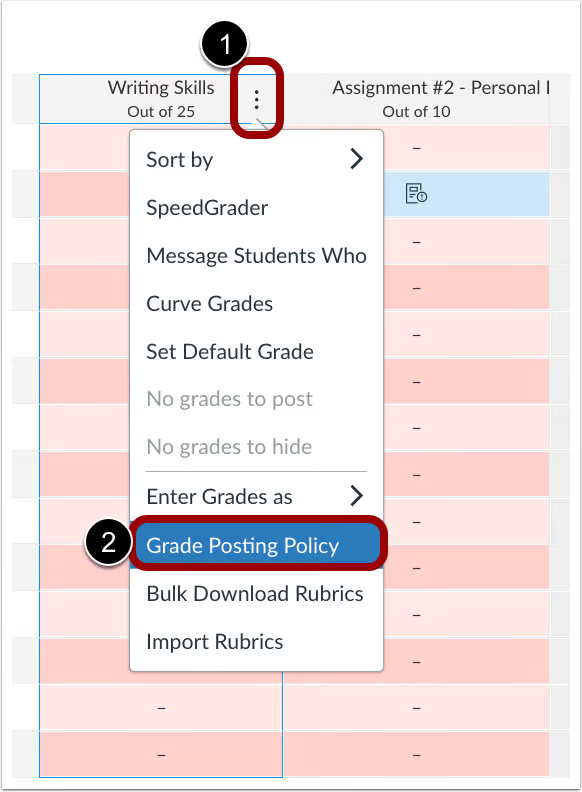
Gradebook Assignment Options
Click the Manually radio button [1], then select the Schedule Release Dates checkbox [2]. Choose whether to release Grades and Comments Together or on Separate Schedules [3], and set the Release Date [4] and Time [5].
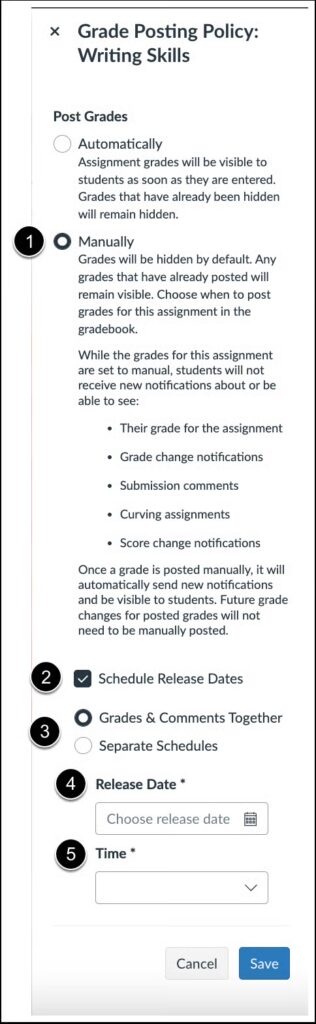
Assignment Grading Policy Modal
Notes:
- When the release schedules are separated, comments must be released prior to grades.
- Preserving scheduled feedback release dates during course copy/import is not currently supported.
- If an instructor manually releases grades before the scheduled release time, the manual release takes precedence and the scheduled release is canceled
New Quizzes – Survey Support
Production Environment Availability: 12/13/2025
New Quizzes supports Survey-type quizzes, allowing instructors to collect anonymous or non-anonymous feedback, with graded or ungraded options. Instructors can view survey data in the Reports tab.
Surveys support the following question types:
- Multiple Choice
- Multiple Answer
- True/False
- Fill in the Blank
- Essay
- File Upload
This feature gives educators a more intuitive way to engage students and promote reflection. It also helps educators more easily gather feedback, gauge understanding, and foster open reflection.
When creating a quiz, click the Quiz Type drop-down menu to select the survey type.
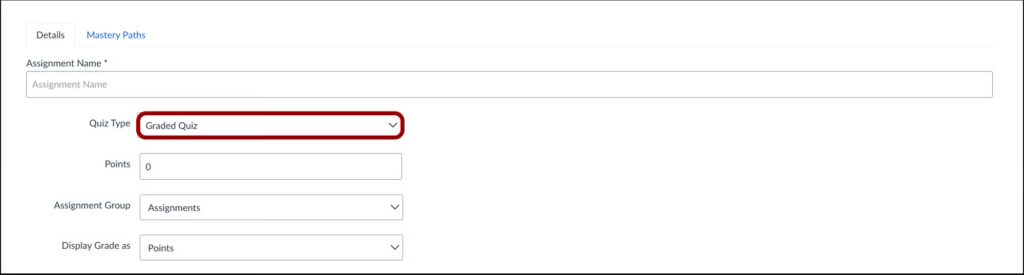
New Quiz Moderate Page
Instructors can click the View Log link in the activity log’s Moderate tab to see individual results.

New Quiz Reports Page
In the Reports tab, instructors can view a breakdown of the results for each question.
Additional Details
- Surveys created in Classic Quizzes can be easily migrated into New Quizzes.
- Questions can be set as required or optional.